smalltalk-from-scratch — Part 7
Forty Years of BitBlt
The decision to replace Smalltalk-80's 1980 display model with GPU-accelerated rendering: deleting Form, BitBlt, and Pen from the codebase and building Wise Owl Smalltalk on SDL2 and SkiaSharp.
Part 7 of 7. Part 6 covered the first display system: BitBlt in C#, the System Browser, and snapshot save/restore. This part covers why we replaced all of it.
By January 2026, the system was working. It was a genuine Smalltalk-80 environment — the 1983 class library, running on a correct implementation of the Blue Book’s object model and bytecode interpreter, displaying through an accurate implementation of the original BitBlt rendering pipeline. You could open the System Browser, navigate the class hierarchy, read method source code, edit a method, recompile it, and see the result. It was the real thing.
It was also showing its age in ways that made continued development increasingly uncomfortable.
The Problem With BitBlt
BitBlt is forty years old. That is not, by itself, a problem. The bytecode interpreter we built is based on a forty-year-old specification and it works beautifully. The object model we implemented is from 1983 and it is one of the most elegant things in computer science.
But BitBlt is specifically a rendering primitive designed for monochrome bitmaps on 1970s-era display hardware. Every pixel is either black or white. The XOR cursor trick works because in a 1bpp world, XOR is perfect inversion.
The DisplayScreen>>flash: method makes the mismatch concrete. Here is the original:
flash: aRectangle
    "Complement twice the area of the screen defined by aRectangle."

    2 timesRepeat: [
        self fill: aRectangle
            rule: Form reverse
            mask: Form black.
        (Delay forMilliseconds: 60) wait]
Form reverse is rule 6 — XOR. In 1bpp this is a clean inversion. In 32bpp color, XORing produces arbitrary color noise. Here is the same method after the migration:
flash: aRectangle
    "Draw a visible border around aRectangle for rubber-band feedback."

    | canvas paint |
    canvas := DisplayCanvas current.
    canvas notNil ifTrue: [
        paint := Paint new color: 16rFF000000.  "Black"
        paint style: #stroke.
        paint strokeWidth: 2.
        canvas drawRect: aRectangle paint: paint.
        paint dispose.
        DisplayCanvas present.
        ^self].

    "Legacy mode: use BitBlt XOR"
    2 timesRepeat: [
        self fill: aRectangle
            rule: 6  "XOR"
            mask: Color black.
        (Delay forMilliseconds: 60) wait]
The new version uses drawRect:paint: with an explicit stroke paint. The legacy XOR path survives as a fallback. This dual-path pattern — Canvas if active, BitBlt otherwise — is what the migration looked like across every drawing method in the system.
Part 6 introduced Pen as a subclass of BitBlt — not a client of it, but a structural descendant, inheriting all fourteen of BitBlt’s instance variables. That inheritance made refactoring impossible: there was no path to a new rendering model that preserved Pen as-is. Deleting BitBlt meant reimplementing Pen from scratch around Canvas drawing primitives.
The 32bpp conversion I’d done earlier — representing the 1bpp Display Form as 32bpp grayscale — was technically correct but aesthetically poor. Text was slightly hard to read. The whole environment felt like a museum exhibit rather than a working tool. The question I asked in January was: what would this system look like if it used a real 2025 graphics API?
The Fork
Rather than modify the existing Smalltalk-80 codebase in place — which would mean the working, authentic implementation gradually disappeared as I replaced pieces of it — I forked it. The Smalltalk-2026 repository starts from the same codebase as Smalltalk-80 but diverges in early January 2026. Smalltalk-80 is the authentic implementation, preserved. Smalltalk-2026 is the modernized version.
The modernization touched essentially every layer of the system, which made the fork essential. Having a stable reference (Smalltalk-80) that I could compare against at any point — “does the modernized version still do the right thing here?” — was invaluable.
SDL2 and SkiaSharp
Two libraries replaced the Windows Forms display and the BitBlt engine.
SDL2 (Simple DirectMedia Layer) handles window creation, input events, and an OpenGL context. It’s cross-platform and mature, and its C API is wrapped well in C# via the SDL2-CS bindings. Using SDL2 means the system is no longer Windows-only — the same code compiles and runs on Linux and macOS, which matters for a system that wants to be genuinely useful.
SkiaSharp is C# bindings to Google’s Skia graphics library — the same 2D graphics engine used by Chrome, Android, and Flutter. Skia provides a Canvas API: you get a canvas object, you call DrawText, DrawRect, DrawLine, DrawBitmap, set paint colors and stroke widths and blend modes, and Skia handles the actual pixel manipulation, GPU compositing, and antialiasing.
The Phase 1 completion note from January 5th: “SDL2 + SkiaSharp graphics working.” This was the foundation.
The Canvas Model
The Smalltalk-80 display model is immediate mode: code draws directly to the Display Form, one BitBlt call at a time. When a window needs to be repainted, it redraws itself from scratch. There’s no retained representation of what’s on screen.
The Canvas model used in Smalltalk-2026 is also immediate mode in a sense — you issue drawing calls and they appear — but the implementation is GPU-accelerated and double-buffered. The Canvas has a backing surface that accumulates drawing commands. When you call present, the surface is composited to the screen via the GPU. The drawing commands themselves are much higher level: instead of “copy this 16×4 bitmap to this location using combination rule 3,” you say “draw this text in this font at this location with this color.”
The Canvas is exposed to Smalltalk code through a new set of primitives numbered in the 300s. This is the actual Canvas class definition in the modified source:
Object subclass: #Canvas
    instanceVariableNames: 'handle'
    classVariableNames: ''
    poolDictionaries: ''
    category: 'Graphics-Canvas'!

Canvas comment:
'I am a GPU-accelerated drawing context using SkiaSharp.
I provide methods for drawing shapes, text, and images to a surface.

Instance Variables:
    handle  <SmallInteger>  Handle to C# SKCanvas object

Use DisplayCanvas current to get the screen canvas.
Use Surface>>canvas to get a canvas for off-screen drawing.'
One instance variable — a handle to the underlying C# SKCanvas object. Every drawing method is a thin primitive wrapper:
!Canvas methodsFor: 'drawing - shapes'!
drawRect: aRectangle paint: aPaint
    "Draw a rectangle outline."
    <primitive: 310>
    ^self primitiveFailed!
fillRect: aRectangle paint: aPaint
    "Fill a rectangle."
    <primitive: 311>
    ^self primitiveFailed!
drawLine: p1 to: p2 paint: aPaint
    "Draw a line from p1 to p2."
    <primitive: 314>
    ^self primitiveFailed! !

!Canvas methodsFor: 'drawing - text'!
drawString: aString at: aPoint font: aFont paint: aPaint
    "Draw text at a point."
    <primitive: 325>
    ^self primitiveFailed! !
Compare this to the fourteen instance variables and complex inner loop of BitBlt. A Canvas drawing call is: prepare a Paint object (color, stroke width, blend mode), call the primitive, done. The C# side invokes the corresponding SKCanvas method directly.
Form — the four-field bitmap class that BitBlt operated on — is replaced by Surface:
Object subclass: #Surface
    instanceVariableNames: 'handle handleGen recreationFailed sourceType sourceData '
    classVariableNames: ''
    poolDictionaries: ''
    category: 'Graphics-Canvas'!

Surface comment:
'I am a GPU-backed image buffer using SkiaSharp. I replace Form for GPU-accelerated graphics.
...
Source Types:
    #extent   - Created via extent: (recreatable from sourceData Point)
    #file     - Loaded via fromFile: (recreatable from sourceData String path)
    #transient - Screen capture via fromDisplay: (NOT recreatable)'
The sourceType and sourceData fields are new: a Surface knows how it was created, so it can recreate itself if the GPU context is lost (e.g., window resize). A Form had no such self-knowledge.
The View class hierarchy was extended to support this: each View implements drawOn: aCanvas, a method that takes a Canvas object and renders the view’s content using Canvas primitives. The controller loop drives a redraw cycle: for each view that needs redrawing, it creates a Canvas targeting the backing surface, calls drawOn:, and then calls present to flush the result to the screen.
Removing BitBlt
The BitBlt removal was systematic and tracked commit by commit. The strategy was to work outward from the UI components: identify every place a View or Controller called BitBlt or wrote directly to the Display Form, replace it with an equivalent Canvas operation, and verify that the rendering was correct.
This process revealed how thoroughly BitBlt permeated the system. A partial list of things that originally used BitBlt:
- ScrollController: moving the marker (scrollbar thumb), filling the scrollbar region
- Paragraph: displaying the text cursor (caret), highlighting selected text
- ParagraphEditor: deselecting/selecting text regions, rubber-band selection
- View: drawing window borders, highlight effects
- SwitchView: displaying button icons (Form images), button depression
- StandardSystemView: drawing the window title bar
- BinaryChoiceView: the modal dialog, which saved and restored screen content behind it using BitBlt
- FillInTheBlank: same as BinaryChoiceView
- Form animation: moving Forms across the screen with background restoration
For each of these, the BitBlt calls were replaced with Canvas equivalents and the display logic was simplified. The caret became a vertical line drawn by Canvas drawLine:. Selected text highlight became a filled rectangle drawn by Canvas drawRect:. The Form icons in SwitchView became Canvas drawBitmap:at:.
The most significant simplification was eliminating the “save and restore screen content” pattern entirely. The original BinaryChoiceView saved the screen region behind the dialog using BitBlt before showing it, then restored it when the dialog closed. This pattern existed because immediate-mode BitBlt rendering has no retained scene representation — once pixels are overwritten, they’re gone. With double-buffered Canvas rendering, a full scene redraw from the current system state produces the correct result, so there’s nothing to save and restore.
By January 7th, the commit message reads: “Summary of BitBlt Removal: ScrollController (Complete), Paragraph (Complete), ParagraphEditor (Complete), View/SwitchView (Complete), StandardSystemView (Complete), DisplayTextView (Complete), BinaryChoiceView (Complete), FillInTheBlank (Complete), Form animation (Complete).”
The View Architecture Redesign
Removing BitBlt from the Views was a prerequisite for a deeper change: redesigning the View class hierarchy to work natively with the Canvas model.
The original Smalltalk-80 View hierarchy was designed around BitBlt. Views held references to their on-screen regions and drew into them directly. The event model was tightly coupled to the display model.
The redesign, completed in January 12-15 under the [ViewRedesign] commit series, introduced new classes:
View2 is the base class for the new view hierarchy. Unlike the original View, which held a reference to its display region and drew into it imperatively, View2 implements drawOn: aCanvas and has no direct knowledge of the display.
TextModel and TextLayout handle text content separately from its visual representation. TextModel holds the string content and selection state. TextLayout computes line breaks and character positions. TextView2 renders a TextLayout using Canvas calls. TextInputHandler processes keyboard and mouse events and updates the TextModel.
ListView2 is a new implementation of the class list, method list, and category list panes in the System Browser. It renders items using Canvas drawText: calls and handles selection with Canvas-drawn highlight rectangles.
EventDispatcher and FocusManager clean up the event routing model. But the deeper change is in the idle behavior of the system, which the original design got fundamentally wrong for modern hardware.
The original ControlManager>>searchForActiveController is the Smalltalk-80 event loop:
searchForActiveController
    "Find a scheduled controller that wants control and give control to it."

    | aController |
    activeController _ nil.
    activeControllerProcess _ Processor activeProcess.
    [Processor yield.
     aController _ scheduledControllers
        detect: [:aController |
            aController isControlWanted and: [aController ~~ screenController]]
        ifNone: [
            screenController isControlWanted
                ifTrue: [screenController]
                ifFalse: [nil]].
    aController isNil]
        whileTrue.
    self activeController: aController.
    Processor terminateActive
[Processor yield. detect: ...] whileTrue. This runs continuously. Processor yield is cooperative multitasking — it gives other processes a turn — but the searchForActiveController process gets rescheduled immediately and starts polling again. When nothing is happening, this loop runs at full CPU speed, checking isControlWanted on every scheduled controller, over and over, burning energy doing nothing.
The low-level primitives follow the same pattern:
waitButton
    "Wait for the user to press any mouse button."
    [self anyButtonPressed] whileFalse.
    ^self cursorPoint

waitNoButton
    "Wait for the user to release any mouse button."
    [self anyButtonPressed] whileTrue.
    ^self cursorPoint
Pure spin loops. [self anyButtonPressed] whileFalse calls the hardware button-query primitive in a tight loop until the condition changes.
On the Alto, this was fine. The Alto was a dedicated personal workstation — no battery, no shared CPU, no other processes that needed it. The machine existed to run Smalltalk. Using 100% CPU to wait for user input was not a problem because there was nothing else the CPU could be doing.
On a 2025 laptop, this design drains the battery noticeably with the system sitting idle. The fan runs. The thermal envelope fills up. And every other process on the machine gets less CPU time because Smalltalk is busy spinning.
The replacement uses OS-level blocking:
waitForPlatformEvent
    "Block until platform events arrive. Primitive 250.
     Returns: 0=input event, 1=timer, -1=timeout.
     This is the core of zero-CPU idle - blocks at OS level."

    <primitive: 250>
    "Fallback if primitive fails - use brief delay instead of spinning"
    (Delay forMilliseconds: 100) wait

hiddenBackgroundProcess
    "Install a default background process that truly idles at OS level.
     Uses primitive 250 to block until platform events arrive.
     Primitive 250 signals ViewSemaphore when events arrive."

    self background:
        [[true] whileTrue: [self waitForPlatformEvent]]
Primitive 250 calls SDL_WaitEvent (or the equivalent OS blocking call) and does not return until an OS event arrives. The background process — the lowest-priority process in the system — sits here. The CPU is genuinely idle. Task Manager shows near-zero CPU when nothing is happening.
This works because both implementations use a two-thread architecture. One thread is the Windows native thread — running the WinForms message loop (in the Smalltalk-80 branch) or the SkiaSharp/SDL2 render loop (in Wise Owl Smalltalk). This thread owns the window and handles OS-level windowing events. It queues input events into a shared structure and signals the Smalltalk thread when events are available. The second thread is the Smalltalk VM thread — the bytecode interpreter, the garbage collector, the process scheduler, everything Smalltalk. It runs entirely on this second thread, never touching the Windows message loop directly.
Primitive 250 is called from the Smalltalk thread. It blocks that thread at the OS level until the Windows thread signals that events are ready. When the Windows thread delivers an event, the Smalltalk thread unblocks, processes the event queue, and blocks again. The two threads never share execution — there is no concurrent access to Smalltalk heap objects from the Windows thread, and no Smalltalk code runs on the Windows thread.
The event process waits on the Smalltalk side:
startEventProcess
    EventProcess := [
        [true] whileTrue: [
            ViewSemaphore wait.  "Blocks at Smalltalk level - signaled by background process"
            [EventDispatcher current pollAndDispatch]
                on: Error do: [:ex | "Protect EventProcess from crashes"]
        ]
    ] newProcess.
    EventProcess priority: Processor lowIOPriority.
    EventProcess resume
When primitive 250 returns (an event arrived), it signals ViewSemaphore. The event process unblocks, drains the event queue via pollAndDispatch, and blocks again. Two OS-level blocking points in sequence, zero spin-waiting anywhere.
This required deleting InputSensor and ControlManager entirely and rebuilding the input pipeline from scratch. The original Controller class itself:
Object subclass: #Controller
    instanceVariableNames: 'model view sensor '
    category: 'Interface-Framework'!

controlLoop
    [self isControlActive] whileTrue: [Processor yield. self controlActivity]
The sensor instance variable is a reference to InputSensor. Every Controller subclass polled the sensor in its own loop. Replacing this meant removing the sensor from every controller and routing all input through the single EventDispatcher instead.
Events arrive as arrays: #(type x y button keyCode modifiers wheelDelta). The dispatcher routes by type to dispatchMouseDown:, dispatchKeyDown:, etc., which find the target view via hit-testing and deliver to its InputHandler.
The modifier keys are pre-cached as eight literal arrays — no allocation per keypress:
ModifierArrays at: 1 put: #().                "0: no modifiers"
ModifierArrays at: 2 put: #(ctrl).            "1: Ctrl"
ModifierArrays at: 3 put: #(shift).           "2: Shift"
ModifierArrays at: 4 put: #(ctrl shift).      "3: Ctrl+Shift"
ModifierArrays at: 5 put: #(alt).             "4: Alt"
ModifierArrays at: 6 put: #(ctrl alt).        "5: Ctrl+Alt"
ModifierArrays at: 7 put: #(shift alt).       "6: Shift+Alt"
ModifierArrays at: 8 put: #(ctrl shift alt)   "7: Ctrl+Shift+Alt"
Input handlers check (mods includes: #ctrl) with no allocation overhead — the kind of optimization that emerges from profiling keyboard-heavy operations.
The new view hierarchy was built alongside the original, with the System Browser being progressively migrated to use it.
Deleting Form and BitBlt
Once the View migration was complete and no UI code depended on Form or BitBlt, the deletions began.
January 15th: thirty-one Legacy* wrapper classes deleted. These were transitional classes created during the migration to provide backward-compatible shims. Once the migration was complete, they were dead code.
February 1st: Form class modernized and then eliminated. The most visible symptom of Form’s reach: DisplayScreen had been a Form subclass since 1983.
Original:
Form subclass: #DisplayScreen
    instanceVariableNames: ''
    classVariableNames: ''
    poolDictionaries: ''
    category: 'Graphics-Display Objects'!
Modified:
Object subclass: #DisplayScreen
    instanceVariableNames: 'bits width height offset '
    classVariableNames: ''
    poolDictionaries: ''
    category: 'Graphics-Display Objects'!
The original DisplayScreen had zero instance variables of its own — it inherited bits, width, height, and offset from Form. Removing Form from the hierarchy meant declaring them explicitly. The Cursor and DisplayScreen classes were refactored to no longer subclass Form. The DisplayBitmap class — the special WordArray subclass that backed the screen bitmap — was deleted.
February 3rd: BitBlt class deleted. Pen class deleted.
The commit message for BitBlt deletion is simply: “Delete BitBlt class (final legacy graphics removal).”
The Pen class — Smalltalk-80’s turtle graphics primitive, which we used to draw the dragon back in Part 6 — was also deleted. Its functionality is available through Canvas drawing primitives in a more natural form.
What Was Added
The modernization didn’t just remove things. Several capabilities were added that the original system lacked:
Syntax highlighting in the code pane. The SyntaxHighlighter class tokenizes method source and annotates it with token types; the Canvas-based code view uses those annotations to color character runs. The default color scheme, from the actual source:
SyntaxHighlighter class >> initialize
    "Set up default syntax colors."
    DefaultColors := Dictionary new.
    DefaultColors at: #keyword put: 16rFF0000AA.  "Blue  - self, super, true, false, nil"
    DefaultColors at: #string  put: 16rFF008800.  "Green - 'strings'"
    DefaultColors at: #comment put: 16rFF808080.  "Gray  - comments"
    DefaultColors at: #return  put: 16rFFAA0000.  "Red   - ^"
    "... plus selector, number, symbol, default"
The syntax highlighter is implemented entirely in Smalltalk — no C# involved. It produces {start. end. type} triples from a source string; the view iterates those triples when drawing each line.
System cursors: the original Smalltalk-80 cursor was a 16×16 1bpp Form, XOR’d onto the display. The new system uses OS-native cursors — the operating system renders the cursor, which means it’s always crisp and correct regardless of display scaling.
Clipboard integration: the system clipboard is now accessible from Smalltalk. Clipboard text returns the current clipboard contents as a String. Clipboard text: aString sets the clipboard. Ctrl+V paste works in text editors.
Modern text navigation: Ctrl+arrow word navigation, Home/End, Shift+selection, Ctrl+A select-all — standard modern text editing behaviors that the original system didn’t have (its keyboard model reflected 1983 conventions).
Exception handling: on:do:, ensure:, and ifCurtailed:. The original Smalltalk-80 had a simpler error handling model. The new system adds a real Exception hierarchy:
Object subclass: #Exception
    instanceVariableNames: 'messageText signalContext '
    category: 'Kernel-Exceptions'!

Exception subclass: #Error        category: 'Kernel-Exceptions'!
Exception subclass: #Warning      category: 'Kernel-Exceptions'!
Exception subclass: #Notification category: 'Kernel-Exceptions'!
BlockContext gains three new methods via primitives 200, 201, and 206:
ensure: terminationBlock
    "Evaluate the receiver. After it completes (normally or by non-local return),
    evaluate terminationBlock. The Smalltalk equivalent of try/finally."

    | result |
    result _ self valueEnsure: terminationBlock.
    terminationBlock value.
    ^result
The event process itself uses on: Error do: as a resilience wrapper — without it, a single unhandled error in event dispatch freezes the UI permanently.
Unicode: FSR (Flexible String Representation) strings that hold either byte-indexed (Latin-1) or word-indexed (full Unicode) content. Character class primitives for Unicode property testing. TextEncoder and TextDecoder for UTF-8/UTF-16/Latin-1 conversion. UnicodeData for case mapping, normalization, and combining class queries — all backed by primitives 270–292. 245 tests.
:= assignment: the original Smalltalk-80 uses a left-arrow ← for assignment — the correct symbol for distinguishing assignment from equality, but untypeable on any modern keyboard. The := digraph, standard in modern Smalltalk variants, is now accepted as an alias. The modified source file contains 3,711 legacy _ arrows alongside 2,169 modern := assignments — old code preserved verbatim, new code written in the modern style, coexisting in the same grammar.
x := 42.        "new: accepted as assignment"
x <- 42.        "original Blue Book arrow, also still works"
884 Tests
The test infrastructure grew throughout this phase. The final count in February: 884 tests across eight test classes, all passing. The CI pipeline runs headless using a NullDisplay stub — a Canvas implementation that accepts all drawing calls and discards them, so the tests can run without a display server.
GitHub Actions runs the full test suite on every push. The workflow: build the C# project, run cold start to produce a snapshot, load the snapshot, file in the test classes, execute all tests, verify exit code. This takes about ninety seconds.
Some measurements that tell the story of how the system grew. The original Smalltalk-80 source file uses 120 distinct primitive numbers in the range 1–137. The modified source file uses 279 primitive numbers in the range 1–398. The new ranges are not random: 200–214 is exception handling and snapshot control, 220–292 is Unicode and filesystem, 300–333 is the Canvas drawing API, 340–398 is Surface, CanvasFont, CanvasPath, Paint, and DisplayCanvas. Each range represents a new layer that didn’t exist in 1983.
Eleven original primitives were removed — among them primitive 96 (BitBlt>>copyBits) and primitive 104 (Pen>>drawLoopX:Y:). Their disappearance from the primitive table is the most concise summary of what changed.
The assignment arrow migration is visible in the raw numbers. The original file contains 4,947 uses of _ and zero uses of :=. The modified file contains 3,711 _ arrows and 2,169 := assignments — old code preserved as-is, new code written in the modern style, coexisting in the same file. The grammar handles both forms. The VM executes both identically. The asymmetry is purely stylistic, a layer of sediment showing which code was written in which decade.
The Name
January 10th, 2026: “Rename window title to ‘Wise Owl Smalltalk’.”
The system had been running with generic window titles through all of the development above. At the point where the SDL2 migration was working, the View redesign was complete, and the system had a distinct character from the original Smalltalk-80 — not a reimplementation of the 1983 system but a descendant of it, with a modernized display layer but the same object model, same bytecodes, same class library — it got a name.
The name comes from the site this series is published on. The system is Wise Owl Smalltalk — a descendant of the 1983 original, carrying its object model and bytecodes forward into a modern rendering stack.
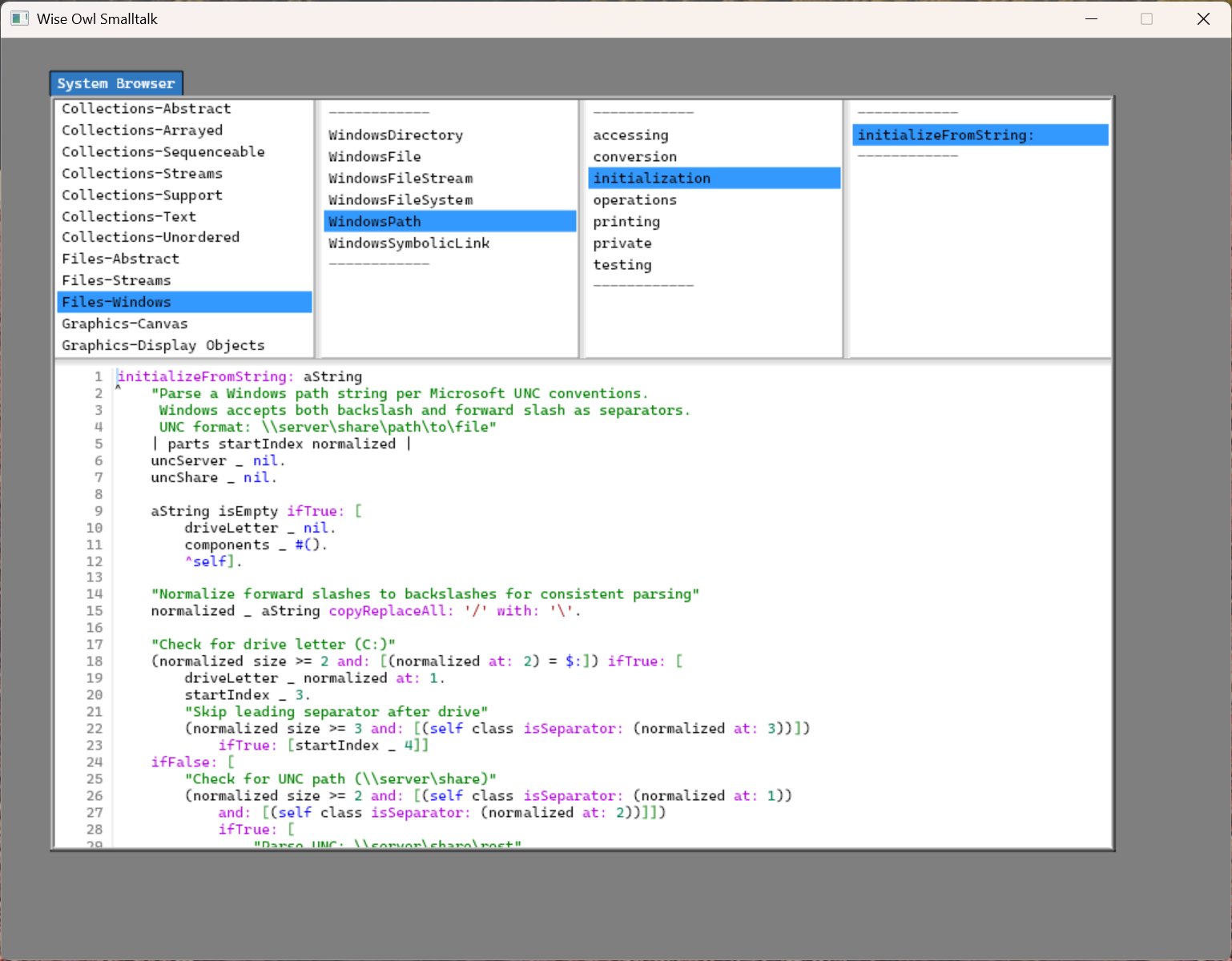
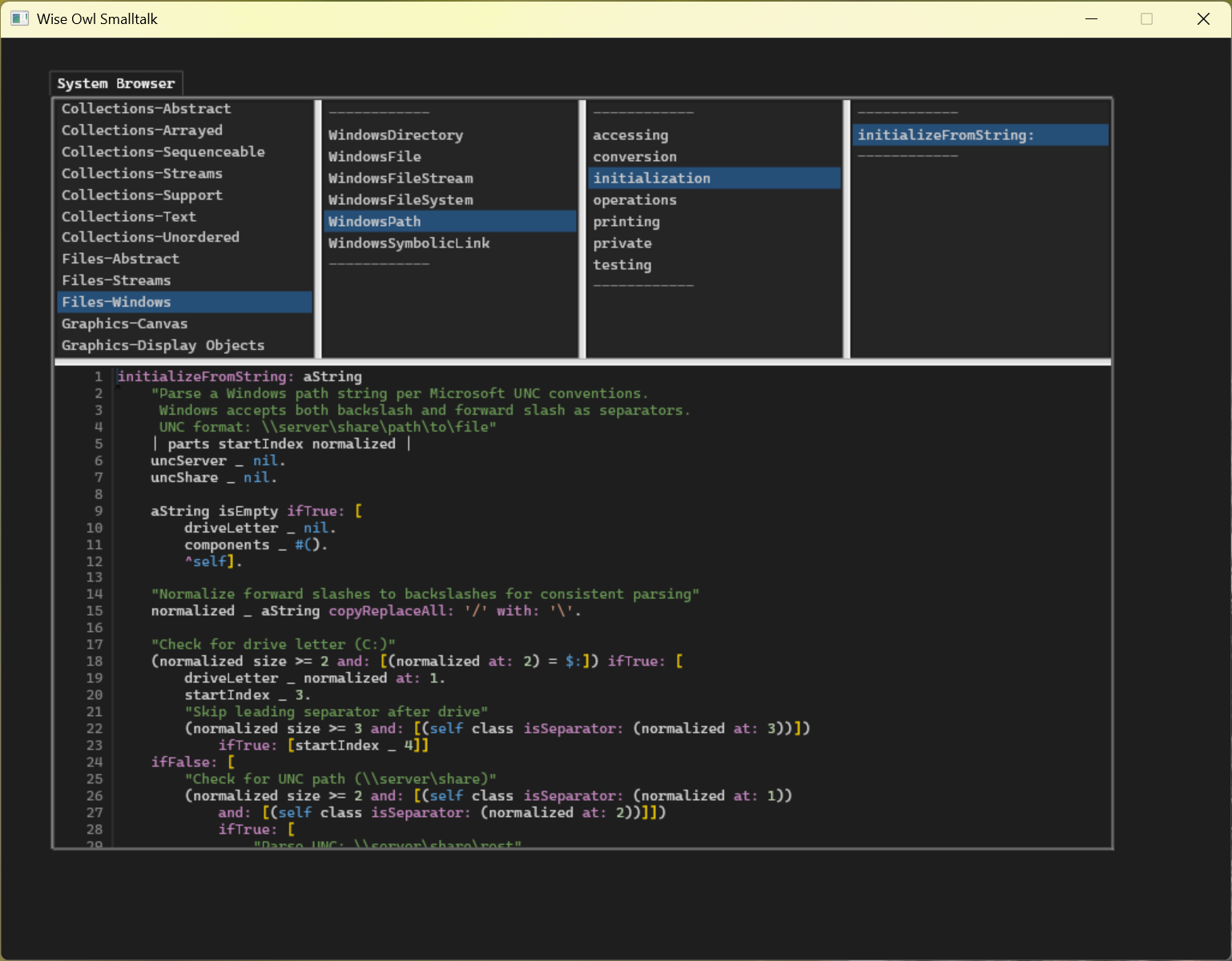
Same window, same method, same code. Both screenshots are Wise Owl Smalltalk. The only difference is the Windows OS theme setting.
In the dark version: the title bar chrome darkens, the background shifts to near-black, and the SyntaxStyler switches from VSCodeLight to VSCodeDark. The VSCode Dark+ color palette is visible in the code pane — green for comments (#6A9955), orange for string literals (#CE9178), gold for block brackets ([ ]), purple for keyword selectors like ifTrue: and ifFalse: (#C586C0), teal for class names (#4EC9B0), blue for self and language constants (#569CD6). The gutter background and list backgrounds shift correspondingly. The four-pane layout, line numbers, and blue selection highlights remain unchanged — those are structural, not themed.
This is the OS theme integration working end-to-end: Windows broadcasts a theme-change notification, the Windows thread queues it as a type-7 event, the Smalltalk thread’s EventDispatcher receives it, UITheme refresh detects the change, calls applyDark, and SyntaxStyler useColorSet: #VSCodeDark replaces every color in the active map. The next frame repaints the entire UI in the new palette. No restart required.
What Changed, Visually
This is the same method, WindowsPath>>initializeFromString:, that appears in the Smalltalk-80 screenshot at the end of Part 6. Same class, same method, same logic. Different systems.
The differences in the screenshots tell the story of everything that changed:
Title bar. “Wise Owl Smalltalk”, not “Smalltalk-2026”. The name commit happened January 10th.
Line numbers. Visible on the left gutter of the code pane, 1 through 28+. The CodeView class gained lineNumbersVisible and lineNumberWidth instance variables. The BitBlt version had no line numbers — adding them would have required reworking the pixel-level text renderer. The Canvas version renders them as a separate column of right-aligned integers using the same drawString:at:font:paint: call as the code text.
Theming. UITheme reads the OS preference at startup via primitive 161 (primGetSystemTheme, returning 0 for dark, 1 for light) and applies the matching palette — applyDark or applyLight — initializing all color class variables at once. Wise Owl Smalltalk not only starts in the right mode but responds to OS theme changes at runtime: EventDispatcher receives a theme-change event (type 7) when Windows switches modes, calls UITheme refresh, and — if the mode actually changed — switches the SyntaxStyler color set between #VSCodeDark and #VSCodeLight and repaints the UI. Both screenshots above show this: same window, different OS setting, completely different color palette applied automatically. The Smalltalk-80 branch used a hardcoded dark background with no equivalent mechanism.
Assignment arrows. In the Smalltalk-80 screenshot, assignments show as ← — the actual left-arrow glyph, because the original StrikeFont was designed for the Alto keyboard where underscore was mapped to the left-arrow character. The Canvas version uses Cascadia Mono, a modern TrueType font where underscore is underscore. The _ assignment arrow renders as _. Both are the same source character (_) — the visual difference is entirely in the font.
Graphics-Canvas category. Visible in the category list in Image 2, absent in Image 1. Canvas, Surface, CanvasFont, CanvasPath, Paint — the entire new display layer, all defined in the modified source file and visible here as a category that didn’t exist in the Smalltalk-80 branch.
More code visible. The BitBlt pane shows roughly ten lines before the scroll boundary. The Canvas pane shows twenty-eight. The Smalltalk-80 branch uses the original monochrome raster fonts — 1bpp bitmap strips stored in StrikeFont.glyphs, designed for low-resolution displays and manually authored for the Alto. The font metrics are fixed integers. Wise Owl Smalltalk uses Cascadia Mono, a TrueType font rendered by SkiaSharp at sub-pixel precision. TrueType hinting produces crisper glyphs at small point sizes, and the font metrics (ascent, descent, line height) are computed from the font’s actual outlines rather than from a lookup table. The same method is longer on screen in the Canvas version because the glyph rendering is tighter and more precise — the same point size occupies fewer pixels.
Blue selections. The selected items (Files-Windows, WindowsPath, initialization, initializeFromString:) highlight in UITheme.SelectionColor — 16r403399FF, a semi-transparent blue. The BitBlt version used white-on-black inversion via Form reverse. The Canvas version composes the selection rectangle as a filled rect under the text, with the text drawn on top.
The CPU is idle while this screenshot was taken. The waitForPlatformEvent primitive is blocking at OS level. The fan is off.
What It Is Now
Wise Owl Smalltalk is a Smalltalk-80 implementation with:
- An authentic Smalltalk-80 bytecode interpreter and object memory, faithful to the Blue Book specification
- The original 1983 class library, plus selective additions from modern Smalltalk practice
- A GPU-accelerated display system based on SDL2 and SkiaSharp, replacing the original BitBlt/Form model
- A redesigned view hierarchy built around
View,InputHandler, andEventDispatcher, replacing MVC’sController/InputSensor/ControlManagerpolling architecture - Zero-CPU idle: the system blocks at OS level when waiting for input (primitive 250 /
SDL_WaitEvent), not spinning in[isControlWanted] whileTrue - VS Code-compatible syntax highlighting via
SyntaxStyler, which maps Smalltalk token types to TextMate scopes and then to colors from aVSCodeDarkorVSCodeLightpalette that tracks the OS theme automatically - Unicode support (FSR strings,
TextEncoder/TextDecoder/UnicodeData, 245 tests) - A structured exception hierarchy (
Exception,Error,Warning,Notification) withon:do:,ensure:,ifCurtailed: - System clipboard integration via primitive 165–167
- 884 automated tests with CI
It runs cold start once, produces a snapshot, and loads from the snapshot on every subsequent launch. It runs on Windows and — with SDL2 providing the cross-platform layer — can be compiled for Linux and macOS.
Seven parts. One complete Smalltalk-80 virtual machine, from grammar to GPU.
The most striking thing about the project, in retrospect, is how consistent the original design is. The metaclass circle that seemed like a philosophical puzzle in Part 1 turned out to be precisely the right structure for method lookup in Part 4. The object table that seemed like an implementation detail in Part 3 made snapshot serialization in Part 6 straightforward. The live-image model that seemed like an oddity in Part 1 is now the operational foundation of the system — cold start is a curiosity; everyone uses the snapshot.
Smalltalk-80 is forty years old. It was designed by people who understood what they were building. Building it again, from the ground up, clarifies exactly how much they got right.